
In the age of HD and 4K broadcasting, viewers naturally expect crisp, clear visuals that reflect the original content quality. However, a hidden problem often goes unnoticed: low-resolution videos being broadcast in higher-resolution formats. This issue is prevalent not only in South Asian satellite channels but also in global online platforms like YouTube.
The consequences of this practice include distorted visuals, blurred details, and a general degradation of viewing experience. Many broadcasters opt for convenience rather than quality, stretching low-resolution videos to fit HD screens instead of preserving their original resolution with proper adjustments.
The Technical Problem: Low-Resolution Video Upscaling
When a video shot in 480p or standard definition (SD) is broadcast in 720p or 1080p, the system must upscale the content. Upscaling involves adding pixels artificially to fill a larger frame. While software can do this, it cannot recreate details that were never captured in the original footage.
Key consequences include:
- Blurring of fine details – Small objects, text, or shapes appear fuzzy.
- Distortion of shapes – Circles, lines, or logos may appear stretched or skewed.
- Color degradation – Color gradients and sharp contrasts often lose clarity.
Even satellite receivers and TVs with auto 16:9 scaling cannot fully correct these problems if the original video resolution is incorrect. The result is a distorted image that disrupts the viewer’s experience.

Common Misconception: Fit-to-Screen Fix
Many broadcasters use the “fit-to-screen” approach to make low-resolution videos appear full-screen. While this may look acceptable at first glance, it sacrifices original quality.
- Shapes and objects get stretched.
- Circles, logos, and graphics lose their original proportions.
- Even professional receiver settings cannot restore the original look.
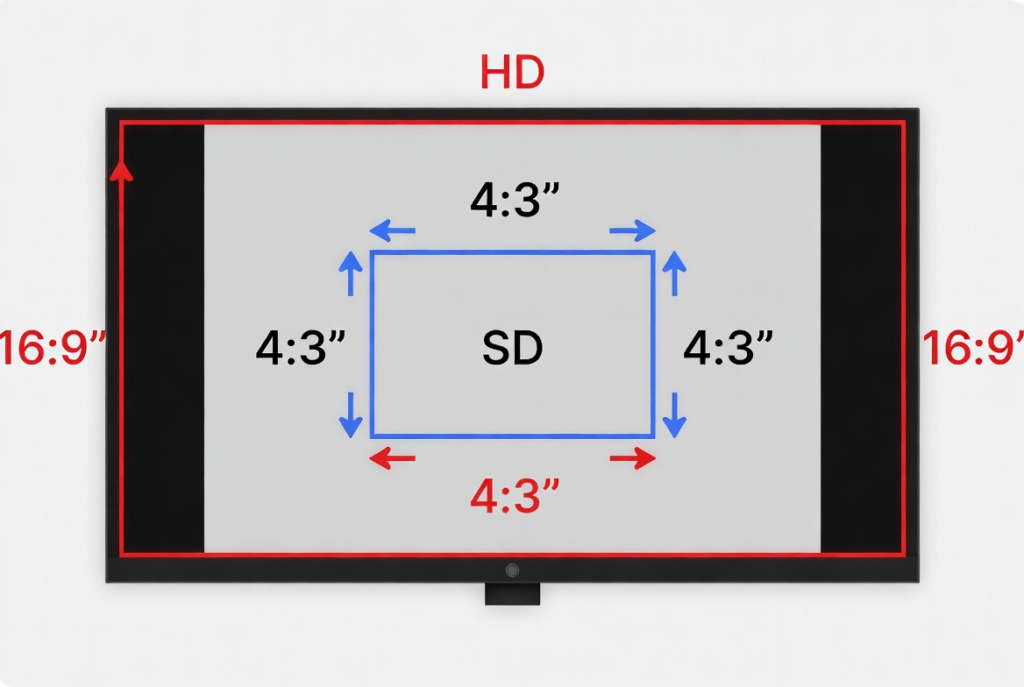
A better solution would be to maintain the original resolution and fill unused screen areas with blank bars (pillarboxing for vertical space, letterboxing for horizontal space). This ensures that the original video content remains visually accurate, even if the full screen is not covered.
Real-World Examples: South Asian Channels
Channels like Geo News, Express News, and Samaa TV have faced criticism for broadcasting content that is not properly adjusted to HD standards. Many legacy programs are still in SD, but instead of using pillarboxing, broadcasters stretch these videos to fit modern screens.
This practice not only degrades viewer experience but also reflects prioritizing convenience over quality. The phenomenon is common globally but is more noticeable in regions where HD adoption is gradual and older content libraries are large.

Conceptual Understanding: Cutting Corners
The root cause of this issue is often “cutting corners” in content production and broadcasting. Broadcasters prioritize:
- Filling the entire screen without black bars
- Quick formatting for modern HD standards
- Reducing costs or technical efforts
Instead of investing in proper HD remastering or using pillarboxing, many choose the shortcut, resulting in loss of content integrity.
From a viewer’s perspective, this leads to frustration, especially when graphics, text, or visual details are crucial, as in news or sports broadcasts.
Solutions and Best Practices
- Maintain Original Resolution Whenever Possible
- Shoot or preserve content in the final intended resolution (HD, Full HD, 4K).
- Avoid unnecessary upscaling that adds no new detail.
- Use Pillarboxing or Letterboxing
- If SD content must be broadcast in HD, use blank bars to preserve aspect ratio.
- This prevents stretching and ensures visuals remain faithful to the original.
- AI-Based Upscaling for Legacy Content
- Tools like Topaz Video Enhance AI or Adobe Super Resolution can enhance SD content while preserving fine details.
- Test on Actual Broadcast Devices
- Always check videos on satellite receivers, TVs, or streaming platforms.
- Auto-scaling cannot correct all distortions if the original video resolution is incorrect.
Global Relevance
This problem is not limited to South Asia. Globally, even platforms like YouTube often feature old videos upscaled to HD. Without proper scaling or pillarboxing, the original content loses sharpness and clarity.
The difference is that large international studios often:
- Remaster older content professionally
- Use AI-enhancement tools
- Preserve content integrity even when upscaling
In regions with smaller production budgets or legacy archives, the problem is more noticeable.
Conclusion
The hidden problem of low-resolution videos in HD broadcasting affects both satellite channels and online streaming platforms. Stretching SD content to HD screens results in:
- Distorted shapes and graphics
- Blurred visuals and lost details
- Degraded viewer experience
The solution is simple yet underutilized: preserve original resolution, use pillarboxing/letterboxing when needed, and consider AI-enhancement for legacy content.
Broadcasters need to prioritize quality over convenience. Only then can viewers truly enjoy HD content as it was meant to be seen.

highlighting the difference in shape and clarity on an HD monitor.